Why Corporate .docx Files Break AI Agents
A .docx is a zip of XML with no pages in it. Ogcode reads Word documents (.docx, .docm, .dotx) directly, with no Word, LibreOffice or conversion service: it resolves heading styles, extracts tables, footnotes and text boxes, groups the text into deterministic pseudo-pages, notices when the index has gone stale, and opens one page or a run of pages at a time with checkable citations.


Word documents are where work actually lives. The specification, the vendor agreement, the memo from legal, the architecture decision record, the onboarding guide nobody has edited since 2021. Ask an agent to read one, and one of three things usually happens: it shells out to LibreOffice or pandoc or python-docx, it sends the file to a cloud conversion service and waits, or it reads the filename and invents the contents.
All three treat the format as an opaque black box that needs a heavyweight translation engine. It isn’t. A Word document in the Open Packaging Convention format is a standard ZIP file full of XML, and the XML is mostly structured paragraphs.
We previously wrote about reading PDFs one page at a time. This is the same architectural pattern applied to the document format that dominates corporate workflows. The mechanics differ in one fundamental respect: a PDF has explicit physical pages pre-rendered by a layout engine. A Word document has no pages at all.
In short: a Word file has no pages, so an agent that needs to cite one has to invent them. The trick is to invent them the same way every time: respect real page breaks, cut where a heading makes a clean break, label each page once in a table, and open only the page the question needs. This post walks through how Ogcode does that, including what changed since the first version of this post.
A .docx is a ZIP
Rename quarterly-review.docx to quarterly-review.zip, run unzip -l, and the mystery disappears:
Archive:  quarterly-review.docx
  Length      Date    Time    Name
---------  ---------- -----   ----
     1351  1980-00-00 00:00   [Content_Types].xml
      590  1980-00-00 00:00   _rels/.rels
     1892  1980-00-00 00:00   word/_rels/document.xml.rels
   182410  1980-00-00 00:00   word/document.xml
    32104  1980-00-00 00:00   word/styles.xml
     8421  1980-00-00 00:00   word/footnotes.xml
     4102  1980-00-00 00:00   word/endnotes.xml
A .docx is not a document. It is a zip file that describes one.
The standard wraps an entire document ecosystem into one container. Ogcode’s indexer accepts the three OOXML word-processing containers:
.docx: standard Word documents..docm: macro-enabled Word documents. The underlying XML is identical; the macro payload lives in a separate binary part..dotx: Word document templates.
(Legacy binary .doc files from Word 97 to 2003 are a different format entirely. They are not ZIP archives, and the reader says so in plain language: convert the file to .docx first. A ZIP error would only send the agent hunting for the wrong problem.)
To read any of these, Ogcode needs no Cgo bindings, no Python runtime and no external command-line utility. The Go standard library opens the archive and streams the XML, one token at a time.
Only word/document.xml is mandatory. Styles, footnotes and endnotes are read when present. If one of those parts is missing or broken, extraction continues: a custom heading simply goes unflagged, or a note body is missing while its [^1] marker stays where it was.
Streaming the XML
A production Word document can contain hundreds of thousands of XML tokens. Building the whole tree in memory wastes allocations and time. Ogcode uses a streaming tokenizer instead:
<w:p>
  <w:pPr>
    <w:pStyle w:val="Heading1"/>
    <w:pageBreakBefore/>
  </w:pPr>
  <w:r>
    <w:t>System Architecture</w:t>
  </w:r>
</w:p>
The extractor handles the structural parts of WordprocessingML that carry meaning:
- Paragraphs and runs:
<w:p>begins a paragraph,<w:r>is a character run with shared formatting, and<w:t>carries literal text. - Breaks and tabs: an explicit
<w:br w:type="page"/>forces a page boundary. Soft breaks (<w:br/>), carriage returns (<w:cr/>) and Word’s saved layout marks (<w:lastRenderedPageBreak/>) become newlines and never split a page. That last detail matters: a page break recorded by whoever last opened the file would otherwise make page numbers depend on their screen resolution or printer driver. Tabs become\t. - Text boxes: Word stores a text box’s content in its own paragraphs, nested inside the drawing that holds it. A naive parser drops the outer paragraph when it meets the inner one, so “before [box] after” turns into “before”. Ogcode tracks paragraph depth and appends the inner text where it sits, so the sentence survives in reading order.
- Tables: a table has rows, and rows have cells. Each row becomes one line, with cells separated by tabs, so columns still line up. Several paragraphs inside one cell are joined with a space rather than a newline, and a nested table folds into the cell that holds it.
- Footnotes and endnotes: references are rendered as
[^1]and[^e1], numbered by their order of appearance rather than Word’s internal ids, which skip after edits. The bodies come from the notes parts and are appended to the page that references them, so a note travels with the sentence it qualifies. - Tracked changes: the extractor reads ordinary text runs. Text Word marked as deleted sits in a different element (
w:delText) and never enters the text; insertions are ordinary runs and do enter. The result is the document with all revisions accepted, which is the only version a citation can be checked against. - Unusual and hostile files: every part is inflated under a hard ceiling, so a few kilobytes of XML cannot expand into gigabytes and take the process down. Parts saved as UTF-16, or in another declared character set, are converted before parsing. A file that is not a valid archive returns an error instead of a crash.
The extractor’s job is not to render the page. It is to recover the text and the structure a reader would have seen.
Inventing the Pages
The central design problem with Word documents is that they are a continuous reflowable stream. Word calculates page breaks dynamically, based on page margins, zoom, paragraph kerning, installed fonts and the typography engine of the operating system. A headless agent running in a container has none of that layout machinery.
If you don’t paginate, you must feed the entire document to the model at once. In a 120-page technical specification, that eats about 80,000 tokens, drowns the prompt, degrades reasoning and prevents the agent from citing a verifiable source.
The naive alternative, cutting the text at a fixed word count, produces a subtle disaster:
[Page 12: word limit reached]
... We evaluated three potential storage architectures for the consensus
log: Raft over BoltDB, Paxos over RocksDB, and SQLite in WAL mode.

[Page 13: word limit reached]
1. Raft over BoltDB
The primary advantage of BoltDB is its pure-Go implementation and B+tree
crash resilience. However, write amplification under sustained throughput ...
A rigid ceiling regularly severs a heading from the paragraphs it describes, or splits a single paragraph across two arbitrary pages. If an indexer labels Page 12, it might see that storage options were evaluated but miss the actual analysis. If Page 13 starts with “1. Raft over BoltDB”, the context identifying it as part of the consensus log decision was left behind on Page 12.
Heading-Aware Pagination
Ogcode’s paginator pairs a baseline word budget with heading lookahead:
                    word budget reached
                            │
                            ▼
Paragraphs: [█████████████████████] ─── flush point
                            │
                            │ ◄── lookahead window
Paragraphs: [░░░░░░░░░░░░░░░░░░░░░░░░░░░░░░░]
                                ▲
                                │
                         Heading detected!
                                │
                   Flush HERE ──┘
(Heading starts Page N+1)- Explicit breaks win: an explicit page break or an active
<w:pageBreakBefore/>property flushes the page immediately, with a guard against manufacturing an empty first page. - Baseline accumulation: paragraphs accumulate until the page reaches its word budget.
- Heading lookahead: once the budget is reached, the paginator keeps reading a little further, up to half the budget again. If a heading appears in that window, the page ends just before it. The heading opens the next page at the top, with its section intact.
- Ceiling fallback: if no heading fits inside the lookahead, the page ends at the paragraph boundary where the budget was reached.
Soft breaks and Word’s saved layout marks never take part in this. Only a real page break or a page-break-before property does.
The result is deterministic. The same file produces the same pages on every machine, with no fonts, margins or printer drivers involved. The trade is that page numbers belong to a version of the file: edit the document, re-index it, and a section can move. That is why the index checks the file before it trusts its own labels.
Word counts also have to work in languages that do not put spaces between words. A whitespace count would read a long Chinese memo as a single word and collapse the whole document into one page. Ogcode counts a long unspaced run by its length instead, so Chinese, Japanese and Thai prose paginate at roughly the same density as English.

Resolving Styles and Outlines
Detecting a heading in Word is not a matter of looking for bold or large text. Heading definitions live in word/styles.xml:
<w:style w:type="paragraph" w:styleId="Heading1">
  <w:name w:val="heading 1"/>
  <w:pPr>
    <w:outlineLvl w:val="0"/>
  </w:pPr>
</w:style>
Ogcode’s style resolver handles three layers of heading determination:
- Normalized heading names: in a Spanish or German installation, Word displays localized style names and can generate localized style ids, but it still records the invariant English name in
<w:name w:val="heading 1"/>. Reading that name identifies a standard heading regardless of the document’s locale. - Explicit outline levels: a paragraph or style can declare an outline level from 0 to 8. Level 0 is the top title, levels 1 to 8 are subheadings, and level 9 is body text, which is ignored. Only paragraph styles count. A character style or a table style with a promising name is not a heading.
- Style inheritance chains: custom organization styles often inherit from a base heading style. Ogcode walks the
basedOnchain, with cycle detection, so a malformed document cannot loop forever and a house style calledExecutiveHeadingstill paginates likeHeading1.
When a document is converted from plain text without heading styles, such as text run through Apple’s textutil, the lookahead simply steps aside and the paginator relies on explicit breaks and the word budget.
Two Tools, One Flow
Word document interaction in Ogcode mirrors the PDF model: two complementary tools exposed to the agent.
                  ┌──────────────────────┐
                  │      User asks       │
                  │  "What are our SLA   │
                  │     commitments?"    │
                  └──────────┬───────────┘
                             │
                             ▼
                  ┌──────────────────────┐
                  │      docx_index      │
                  │  (Reads the index,   │
                  │   never the archive) │
                  └──────────┬───────────┘
                             │
            Page 4: "SLA, uptime, maintenance windows"
                             │
                             ▼
                  ┌──────────────────────┐
                  │    read_docx_page    │
                  │  (Extracts page 4,   │
                  │   then keeps it in   │
                  │   a small cache)     │
                  └──────────┬───────────┘
                             │
                             ▼
                  ┌──────────────────────┐
                  │    Precise answer    │
                  │  with page citation  │
                  └──────────────────────┘
1. docx_index
When an agent needs to survey a document, calling read_docx_page on every page would flood the context window. Instead, it calls docx_index:
{
  "path": "contracts/vendor-sla-2026.docx",
  "start_page": 1,
  "end_page": 10
}
The tool reads the local index and returns a dense catalogue of page summaries and topical labels. The ZIP archive is not touched, so the answer comes back in a few milliseconds.
Crucially, docx_index supports range slicing. In a 140-page technical specification, returning all 140 page labels at once would cost about 4,000 tokens. Range slicing lets the agent scan chapter by chapter, narrow to the relevant section, and only then fetch a page of text. Bounds are clamped to the document, and an empty range says which pages were asked for and what the document actually holds.
An index is only useful while it still describes the file. Before answering, docx_index compares the document’s modification time with the time recorded when it was indexed. If the file is newer, the listing is labelled (stale index) and the agent is told to run ogcode index again. A file that has moved or disappeared says the index may be stale. A file that has never been indexed says to run the index first. None of these cases quietly return yesterday’s page numbers.
2. read_docx_page
Once the agent identifies the target page, it calls read_docx_page:
{
  "path": "contracts/vendor-sla-2026.docx",
  "page": 4
}
The agent receives only that page, with formatted tables, inline footnote markers and appended note bodies.
A second argument, end_page, reads a run of consecutive pages in one call. A section that spans pages 4 to 6 costs one archive read and one response instead of three. Each page in the run is introduced by a line such as --- page 5 ---, so the model never loses track of which text belongs where.
Bad bounds get a plain answer. A page past the end reports how many pages the document has and points back at docx_index. An empty document says it has no extractable text. A page with nothing on it says so instead of returning a blank the model has to interpret. A legacy .doc file gets the conversion hint, not a ZIP error.
The In-Memory Cache
If an agent needs Page 4, then Page 5, then Page 6, unpacking and parsing a large archive on every call would be slow. The reader keeps a small LRU cache of extracted pages in memory:
- Bounded footprint: a fixed number of documents and a ceiling on the extracted text held. At least one entry is always kept, so a single oversized document cannot make the cache thrash.
- Identity: the absolute path, the file size, the nanosecond modification time, and a content stamp built from the first and last few kilobytes of the file.
- Checked on every hit: a
statand two short reads, then the comparison. No archive is parsed again.
The content stamp is the part that earns its keep. A file replaced by a different version, or restored from a backup that preserved the old timestamp, still fails the check. A cache that trusts a timestamp alone will eventually quote the wrong contract.
A cache that trusts a timestamp is a cache that will eventually quote the wrong contract.
The Token Math: Three Ways to Read the Same Document
To see what the architecture buys, take a real 147-page technical document: 68,886 words and 502,199 characters of specifications, architecture notes and service definitions. That is about 125,500 tokens, dividing characters by four, the same back-of-the-envelope convention used in the PDF post. Treat the figures as estimates and trust the shape.
An agent asked a question about that file has three ways to get text in front of the model: dump the whole document, retrieve fragments from a vector index, or keep a labelled table of pages and open the one page the question needs. Per question, the three are not close:
| Dimension | Whole-Document Dump | RAG Pipeline (Vector Search) | Ogcode: Index, Then Pages |
|---|---|---|---|
| What enters the prompt | about 125,500 tokens, the entire document, every turn | about 2,500 tokens, the top five of 279 chunks | about 1,400 tokens, the one or two pages an answer needs |
| Setup | nothing | chunk into 279 windows of 500 tokens with 50-token overlap, embed every one | one background labelling job: pages named once, about 40,000 tokens of labels |
| Ten-question session | about 1,255,500 tokens re-sent | about 25,000 tokens plus ten retrieval round trips | about 19,700, measured; about 54,000 if the whole catalogue is read first |
| Savings against the dump | baseline | about 98%, paid for in broken context | 96% to 98%, with complete pages |
| Structural fidelity | preserved, but drowns prompt attention | poor: splits tables, severs headings, drops footnotes | high: complete tables, resolved footnotes, text boxes in place |
| Verifiability | difficult: the model must point into a 125k-token blob | low: opaque chunk ids without page numbers | exact: checkable page citations, such as “Page 14, Table 2” |
| Accuracy | cut text it cannot see, so a gap reads as the whole story | plausible fragments: nothing to check, and top five never returns nothing | measured: 17 pages opened, 0 misses, absent questions reported absent |
| Latency and cost | severe: tens of seconds before the first token; large token bills | medium: an embedding call and a vector search per question | fast: an index lookup in milliseconds, one page from memory |

The Dump: The Context Cliff
Dumping the converted text directly into the agent’s prompt puts about 125,500 tokens into the context window on every turn. Context compounds: by the tenth question the agent has ferried about 1.25 million tokens through the model, more than any production context window will hold at once. In practice the dump is not a large prompt but a truncated one, and what gets cut is decided by position, not by relevance.
Even with multi-million-token windows, context stuffing has well-known failure modes:
- The context cliff: as we wrote in the 64k context budget, recall and reasoning degrade well before the window is full. Critical clauses in the middle of a 147-page document get missed or misattributed.
- First-token latency: processing a 125k-token prompt takes tens of seconds before the model generates a word.
- Compounding cost: paying for 125,000 prompt tokens on every turn turns a simple research question into an expensive invoice.
The RAG Shortcut: Severed Structure
The standard reaction to oversized documents is a retrieval pipeline: chunk the document into small token windows, embed every chunk, and put the nearest ones in the prompt. The arithmetic is concrete. Windows of 500 tokens with 50 tokens of overlap give 279 chunks for this document; retrieving the top five puts about 2,500 tokens of fragments in front of the model, fifty times less than the dump and, on the face of it, the cheapest line in the table.
For Word documents, that discount is paid in structure:
- Torn tables: a 30-row pricing matrix gets sliced across chunks. The retrieved snippet might contain rows 12 to 18 without the header row, leaving the model to guess what each column means.
- Dangling headings: an outline heading lands at the bottom of one chunk while the obligation it defines starts at the top of the next.
- Orphaned footnotes: note bodies stored at the end of the file get embedded in isolation, severed from the clauses they qualify.
- No page citations: chunks have no idea where they sat in the document, so the agent cannot cite a page a human reviewer can open in Word.
- Cold every time: the retriever ranks from scratch on each question. Nothing it learned on question three makes question four cheaper.
Two costs sit outside that per-question figure, and neither is an accounting trick. The embedding pass reads the whole document once, about 125,500 tokens through an embedding model, before the first question can be asked. And this is the plain, untuned pipeline: chunk, embed, cosine similarity, top five. Production retrieval adds a reranker, metadata filters and often a second model call to repair what the first one missed, every one of which adds latency and tokens the table does not charge.
Ogcode: A Map You Read Once, Then a Page or Two
Ogcode’s two-tool approach treats the document like a database:
- Catalogue once (
docx_index): the agent reads a table of page numbers and labels. For this document it is about 40,000 tokens, roughly 270 per page, built in the background and stored in SQLite. Read whole, it is the most expensive single call in this post. Read as a twenty-page slice, it costs about 5,600 tokens and still tells the agent which chapter holds a clause. - Fetch on demand (
read_docx_page): the agent requests the pages the labels point at, about 850 tokens each, with their tables, footnotes and section context intact. Across these 147 pages the mean is 854: 624 on the shortest page, 1,537 on the longest. A question usually needs the page after it as well, since the clause it asks about tends to break across the page boundary; measured below, the real cost of an answer is about 1,400 tokens.
Nothing is embedded and nothing is re-ranked, and the page that comes back is the page a reviewer can open in Word.
A QA Session, Not a Question
A single question flatters every strategy. Dumping 125,500 tokens once, retrieving 2,500, or opening the pages one answer needs are all affordable. Real use is a session: a pile of questions against the same file, each one landing somewhere else, with the context bill accumulating question by question.
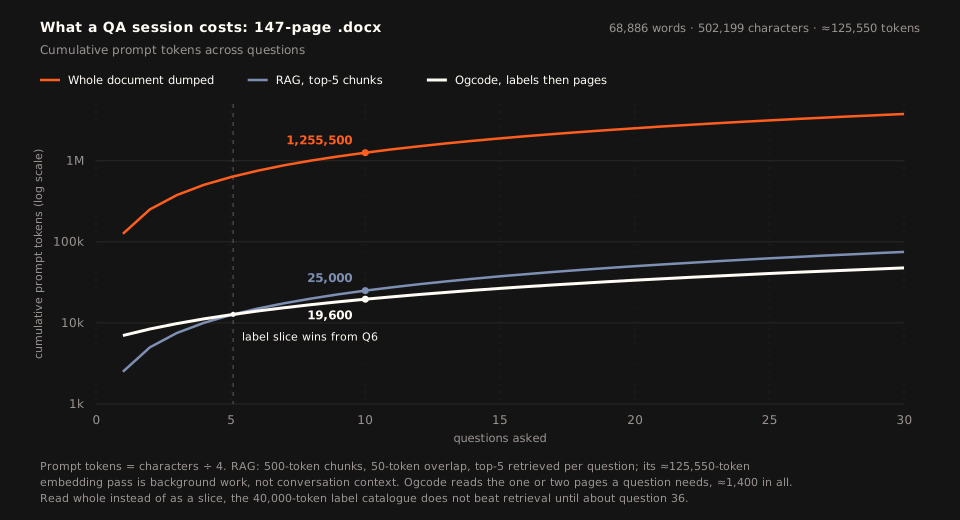
Three things on that chart are worth saying plainly.
The dump is not a competitor. By question thirty it has carried 3.77 million tokens, seventy-nine times what the page model needed, and no production context window holds that much at once.
Retrieval is cheap, and on a short session it beats the index. One question costs 2,500 tokens through retrieval and about 7,000 through a label slice, because the slice has 5,600 tokens of labels to pay off before the first page opens. Retrieval stays ahead until about the fifth question. From the sixth the lines cross and do not come back: each further question adds about 1,400 tokens to the page model and 2,500 to retrieval.
The catalogue is a different trade, which is why docx_index takes a page range. Read whole, forty thousand tokens of labels is the better map, and it does not beat retrieval on tokens until roughly the thirty-sixth question. Read as a twenty-page slice, it is what makes the first ten questions cheap.
What retrieval loses is not the token count. It is what the tokens buy: fragments without headers, fragments without page numbers, and a fresh ranking on every question. The page model spends about 1,400 tokens an answer and gets a page a reviewer can open.
Ten Questions, Asked and Answered, Measured
Estimates are cheap, and the session curve above is still modelled arithmetic. So we ran the same document through the real flow: ten substantive questions, the label map first, then only the pages the labels pointed at, with every page recorded and every answer checked against the page it came from.
| Question asked | Pages opened | Page tokens |
|---|---|---|
What makes a method safe, and what makes it idempotent? → Read-only semantics versus repeatable effect; PUT and DELETE are idempotent, POST is not. | 53–54 | ≈1,669 |
What does a client expect from Expect: 100-continue, and what must the server do? → Send 100 (Continue) or a final status without waiting for the body. | 63–64 | ≈1,658 |
| Which status codes are cacheable by default? → The heuristic list: 200, 203, 204, 206, 300, 301, 308, 404, 405, 410, 414, 501. | 96 | ≈814 |
What does Retry-After mean, and when may it be sent? → A wait time, as a date or a delay; with 503, and with any 3xx. | 68–69 | ≈1,692 |
| How is the origin of a URI determined? → The normalized triple of scheme, host and port, defaulting the port from the scheme. | 16–17 | ≈1,621 |
What may a client change on a 301, and what does the document say about 308? → 301 permits POST→GET; 308 is named as the alternative, and is heuristically cacheable. | 104, 106 | ≈1,649 |
Which headers are hop-by-hop? → Proxy-Connection, Keep-Alive, TE, Transfer-Encoding, Upgrade. | 36 | ≈834 |
When must a server send 405, and what must that response include? → When the method is known but not supported by the target; an Allow header listing what is. | 107–108 | ≈1,629 |
Which fields are required in a 206 response? → Date, Cache-Control, ETag, Expires, Content-Location, Vary, and a Content-Range. | 100 | ≈835 |
What are the rules for Location? → A URI reference resolved against the target URI; meaningful for 201 and 3xx; fragments are inherited. | 67–68 | ≈1,656 |
| All ten questions | 17 page opens | ≈14,057 |
Seventeen page opens, 14,057 tokens: about 1,400 per question, against the flat 850 the model assumed. The gap is not padding. Seven of the ten answers need two pages, because the clause that answers the question starts at the foot of one page and finishes at the head of the next. That is a property of the pagination, and it is the kind of thing only a measurement finds.
Add the 5,600 tokens of labels that told the agent where to look and the session comes to about 19,700 tokens, 98.4% below the 1,255,500-token dump. Retrieval would have carried 25,000 and handed back fragments; reading the whole catalogue first would have carried about 54,000.
Two of our first ten candidate questions were not in the document at all: 429 is defined in RFC 6585, and the rule that Transfer-Encoding overrides Content-Length belongs to RFC 9112. Rather than answer from a plausible-looking page, the run recorded the absence. That is the behaviour you want from a reader that cites pages, and it is not something top-k retrieval hands you for free: five chunks always come back, and none of them says “this file does not cover it”.
Accuracy: A Window Smaller Than the Answer
The token charts above price the three strategies. They do not say what the tokens buy, and that is where retrieval’s bill actually lands. A 500-token window is not a unit of meaning in a Word document; it is a unit of arithmetic, and the arithmetic was chosen before anything was read.
The measured run shows what that gap looks like on the page. Ten questions opened seventeen pages, and every page belonged to the answer that cited it. Each answer came back with the address attached — “pp. 53–54”, “p. 96”, “p. 100” — so a reviewer can open the file and check the sentence, not just the gist.
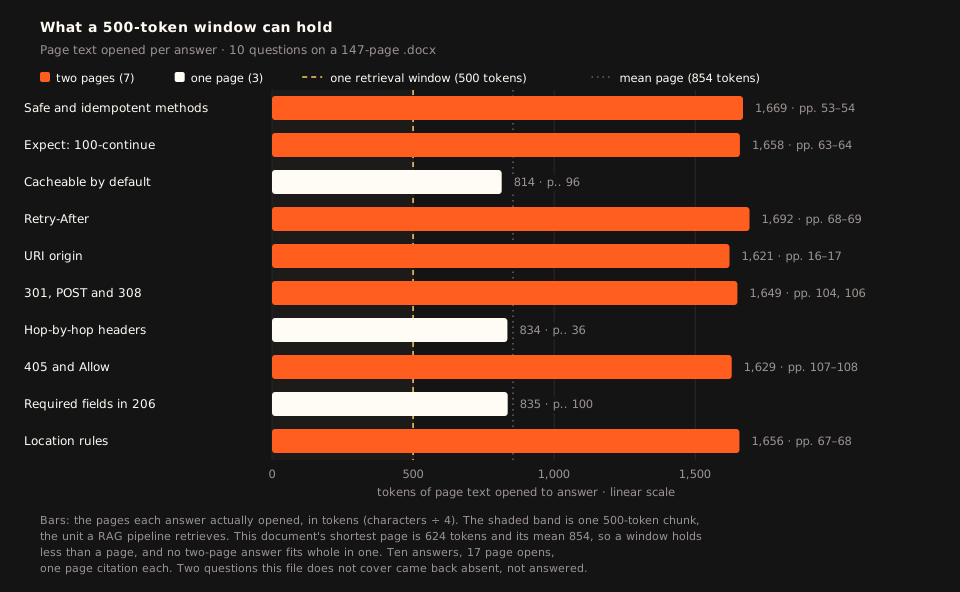
The shortest page in this file is 624 tokens. Every bar above clears the dashed line, and seven of the ten clear it twice over, because seven of the answers begin at the foot of one page and finish at the head of the next. The chunk size was picked to be uniform; the document was not.
Four properties put retrieval in that position.
The window is smaller than the smallest page. With 500-token chunks and 50 tokens of overlap, the document yields 279 of them, and the shortest page still needs 624 tokens to say what it says. An answer that spans a page break has to get both halves into the same top-five draw, and the two halves rarely score alike: the definition and the sentence that qualifies it use different words. When one half misses, the model still receives a fluent passage, so it answers from half an argument in exactly the tone it uses for a whole one.
A fragment has no address. A chunk id identifies a row in a vector store, not a place in the file. Without a page number there is nothing for a reviewer to open and no cheap way to discover that the passage was the wrong one. The page table carries the number from the index into the answer, which is why “p. 100” can appear in a reply at all.
Top five always returns five. The two questions this file does not cover came back absent, because a page model is allowed to return nothing. Retrieval ranks 279 chunks and hands back the best of whatever exists, so the same question returns five passages about caching or message framing, and they arrive looking like a successful search.
The damage looks like an answer. A torn table, a dangling heading and an orphaned footnote all read as prose. There is no error, no gap marker, and no missing page to notice. The spreadsheet post is the sharp version of the same point: a retrieval lane over 4,092 windows got the shape of all ten questions right and the answer to every one wrong, computing £1,392 of net sales from a workbook that holds £1,727,708. Nothing in the output looked broken.
What this does not prove. We did not run a graded head-to-head against a tuned retrieval pipeline, and a number from a hurried one would be a rigged comparison rather than a measurement. Embedding search is good at finding passages, and with reranking and metadata filters it can keep an argument together. The claim here is narrower and measured: on this document, with this index, seventeen pages were opened, none was a miss, every answer carried the page it came from, and the questions the file does not answer were reported as absent.
That is the other half of the token argument. Retrieval is cheap per question and getting cheaper. What those tokens buy is a fragment of a page — and in this document a page is already bigger than the fragment that stands in for it. The part left out does not send an error.
Transactional Indexing
Index generation happens in the background through ogcode index. Pages are labelled in batches, and a large document can take several.
Partial failure used to be the quiet kind of bug. Pages 1 to 100 land in the index, the next batch dies, and an agent asking for a page believes the document ends at page 100. A half-indexed contract is worse than no index. It answers with confidence, and then stops at the page where the data ran out.
That is no longer allowed to happen. Now:
- A failed batch, an extraction error, or a document that yields no pages is logged, counted and returned as an error. Nothing is skipped in silence.
- If any part of a document fails, every row for that document is deleted. The index never holds a partial document.
ogcode indexprints the failure and exits non-zero, so whatever ran it can see that the index is incomplete.- The next run sees the document as unindexed and tries again from the beginning.
Progress is counted per document as well. A 250-page file that spans several batches finishes as one document, not as three partial ones. An agent either sees the whole document or knows the index failed.
An index that is 80% finished is not 80% useful. It is wrong.
What the Agent Sees
When an agent searches for specific clauses in a large Word document, the exchange is fast, bounded and verifiable:
> Check the SLA commitments in contracts/cloud-services.docx

[tool: docx_index path="contracts/cloud-services.docx" start_page=1 end_page=10]
  Page 1: Title, Executive Summary, Parties
  Page 2: Service Definitions, Infrastructure Scope
  Page 3: Data Protection, Security Certifications
  Page 4: Availability Guarantees, Service Credits, Scheduled Maintenance
  Page 5: Support Response Tiers, Escalation Matrix

[tool: read_docx_page path="contracts/cloud-services.docx" page=4]
  # 4. Service Availability Commitments
  The Provider guarantees 99.95% monthly uptime for all production endpoints[^1]...

  | Service Tier | Monthly Uptime | Service Credit |
  | Core API     | >= 99.95%      | 0%             |
  | Core API     | 99.0% - 99.94% | 10%            |
  | Core API     | < 99.0%        | 25%            |

  [^1]: Scheduled maintenance windows on Sundays 02:00-04:00 UTC excluded.
The model answers with the section and the page number:
Under Section 4 of
contracts/cloud-services.docx(Page 4), the monthly uptime commitment is 99.95%. If uptime falls between 99.0% and 99.94%, a 10% service credit applies; below 99.0%, the credit increases to 25%. Sunday maintenance windows between 02:00 and 04:00 UTC are excluded per footnote 1.
The answer is checkable. The prompt spent about a thousand tokens: one page of the contract. No external process was spawned.
If the contract had been edited since the last index run, that first call would have carried (stale index) and a line telling the agent to run ogcode index again. The agent can still choose to use the old labels, but it cannot do the dangerous thing quietly: cite page 4 of a version it never read.
Where This Is Going
The current implementation gives agents fast, deterministic access to the text, tables and notes that make up everyday office documents. Several areas remain open:
- Dynamic list numbering (
word/numbering.xml): Word does not store literal numbers like1.,2.1or(a)in paragraph text. It stores abstract numbering definitions in a separate part. Reconstructing a deep legal list means evaluating those rules against the paragraph’s level. - Hyperlink relationships (
word/_rels/document.xml.rels): an external URL is stored as a relationship id. Mapping ids to their targets would let an agent extract and follow links. - Headers and footers: these live in separate parts and are currently excluded, so a copyright line or an author name does not repeat on every page. Text inside text boxes is included.
- Tracked-changes diffs: letting an agent ask for “revisions rejected” or inline diff markup when it is reviewing a legal redline, rather than always reading the accepted version.
Word documents do not need an office suite or a cloud service to be understood by an AI agent. Treat .docx, .docm and .dotx as the structured ZIP archives they are, stream their XML, respect their style hierarchies, and synthesize heading-aware pages. An agent can then read a contract, a memo or a specification with the same precision and speed it brings to code.
Comments
Join the discussion
Comments run on GitHub Discussions — sign in with GitHub, and the thread lives alongside the repo.
Open the discussion on GitHub